GitHub Repository Access
Being in the TangibleInc GitHub organisation gives you no repository access on its own — the organisation's base permission is none. Access comes from teams. This organises our repositories by purpose, and makes sure access isn't granted too liberally just because someone has been added to the GitHub account.
The practical consequence: a newly created private repository is invisible to everyone except its creator and the org owners until you share it with a team. If a colleague says they can't see a repo, the repo is missing its team grant — don't fix it by adding people individually, or by adding Team Tangible.
For the full team structure, how inheritance works, and audit commands, see GitHub Teams & Repository Access.
The Teams
There are two top-level teams. Team Tangible covers everything aside from hosting, and has five nested teams that grant write access to different repositories. TangibleXP covers hosting and stands alone.
| Team | Slug | Share with it… |
|---|---|---|
| Plugin Development | plugin-development | Product plugins, the framework, the design system |
| One-off Custom Development | one-off-custom-development | Client work — client-specific features, plugins and themes |
| Documentation and Marketing | documentation-and-marketing | Docs sites, training app |
| Tangible One | tangible-one | tangible-app, cloud docs |
| Internal Tooling | internal-tooling | Agency tooling, developer scaffolding, internal integrations |
| TangibleXP | tangiblexp | Hosting infrastructure (txp-*), server box tooling |
Functional teams get write (push) on the repositories they own. Everyone in a functional team is also in Team Tangible, so nobody needs a second grant to reach the shared repositories.
TangibleXP includes an external contributor, so sharing a repository with it shares it with them too. Only do that for hosting work.
Team Tangible Is Not a Shortcut
Team Tangible is the parent of every functional team, so anything you grant it is granted to all staff — and it overrides any lower access a child team was deliberately given.
Team Tangible must not have write access or above to anything except documentation. Read access is fine where everyone genuinely needs to see a repository (the design system, for example). Write is reserved for the documentation sites, so anyone can fix a typo.
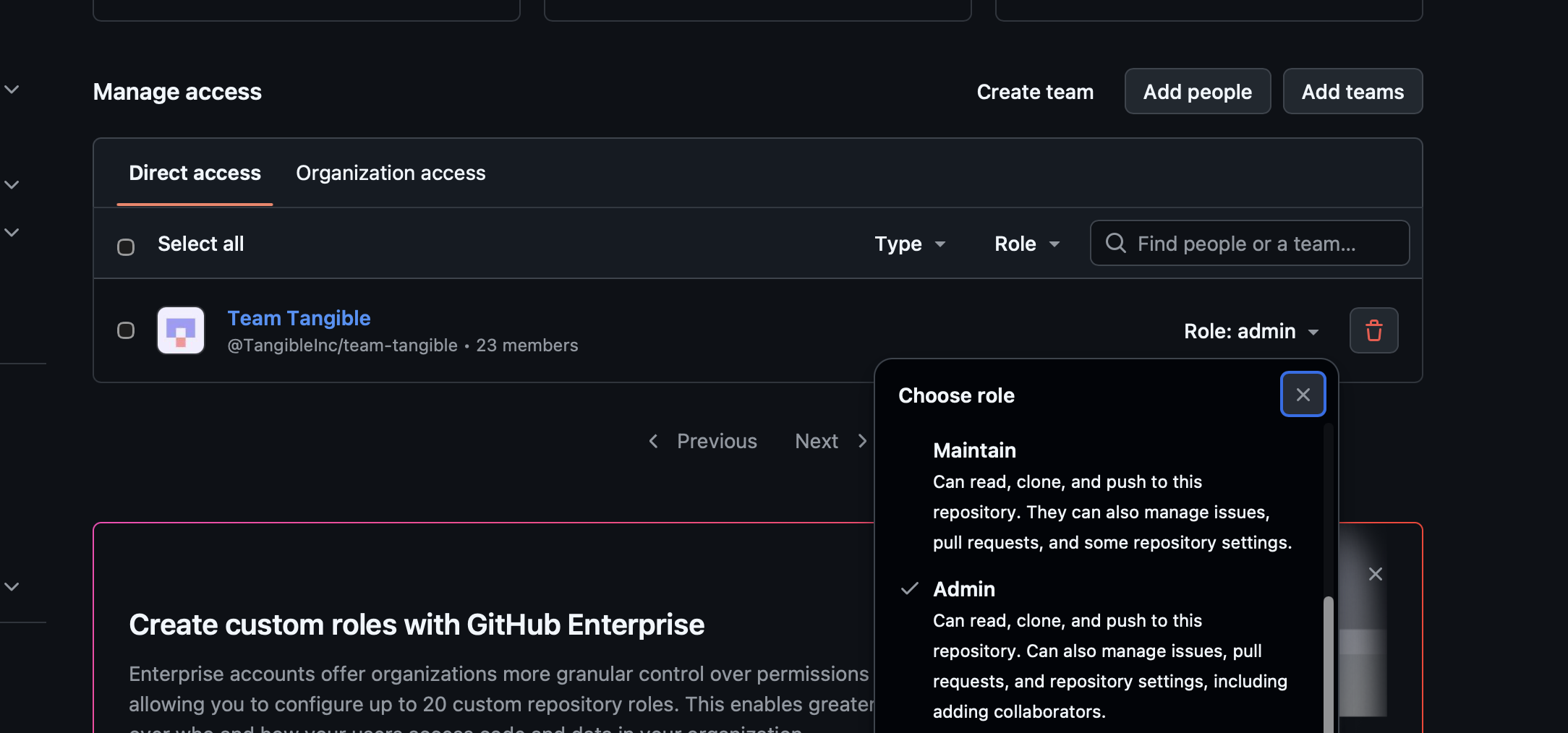
Team Tangible holding Admin on a repository gives all 23 members full control of it, including adding collaborators and changing settings. Client work belongs on One-off Custom Development with write access.
Admin Goes to Individuals
Admin access is the exception to team-based access. When someone needs admin on a repository, invite them to the repository directly with the admin role. Whoever creates a repository already has admin on it.
Admin is never granted to a team — least of all Team Tangible.
When You Create a Repository
- Create the repository in the TangibleInc organisation.
- Decide which functional team owns it using the table above. Client work → One-off Custom Development.
- Grant that team write.
- If anyone else needs admin, invite them directly.
- Only if it's a documentation site, also grant Team Tangible write. Otherwise leave Team Tangible off, or give it read if genuinely everyone needs to see it.
You can do this on the repository's Settings → Collaborators and teams page, or with the GitHub CLI. Claude can run all of these for you too — just say which repository and which team.
GitHub CLI Reference
Permission values are pull (read), triage, push (write), maintain, and admin.
Create a private repository:
gh repo create TangibleInc/REPO --private
Share it with the owning team:
gh api --method PUT orgs/TangibleInc/teams/one-off-custom-development/repos/TangibleInc/REPO \
  -f permission=push
Invite an individual as admin:
gh api --method PUT repos/TangibleInc/REPO/collaborators/USERNAME \
  -f permission=admin
Check which teams can reach a repository, and at what level:
gh api repos/TangibleInc/REPO/teams --jq '.[] | "\(.slug)\t\(.permission)"'
Correct an over-broad Team Tangible grant — downgrade to read, or remove it entirely:
# downgrade to read
gh api --method PUT orgs/TangibleInc/teams/team-tangible/repos/TangibleInc/REPO \
  -f permission=pull

# remove
gh api --method DELETE orgs/TangibleInc/teams/team-tangible/repos/TangibleInc/REPO
Changing team grants needs the write:org scope on your token. Add it with gh auth refresh -h github.com -s write:org.